I combined your two comments for:
- Activate PopClip with no selection, and
- Multiple Actions. (I embellished your simple conditional statement by cribbing the examples in the developer documentation for Module-based extensions.)
My resulting Snippet (below) seems to work well. I’m very pleased with its coding structure because it can be easily extended to support more output formats simply by adding one of the following for each additional format:
DateFormat,switch case, andexports.optionsitem.
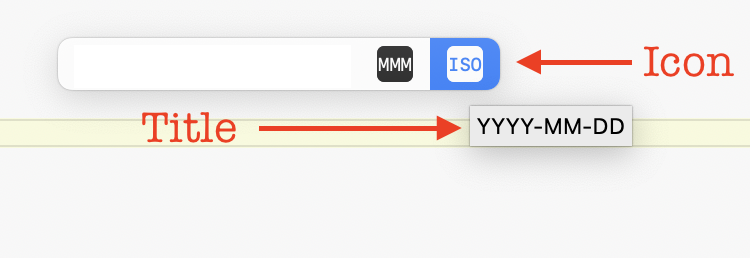
I struggled mightily to create icons that communicated the idea of formatting a date as either ISO (YYYY-MM-DD) or Short Month (DD-MMM-YYYY). Ideally, my icons would have consisted of two parts, an icon for a calendar followed by a modifier that conveyed the format. Ultimately, I settled on just the format because I couldn’t figure out how to combine an icon such as symbol:calendar with text representing the format.
However, I’m pleased to learn that mousing over an icon reveals the title, as you can see in this screenshot:
Please let me know if you have a better idea for either icon.
Thank you.
-nello
// #popclip
// name: Reformat Date
// icon: symbol:calendar
// description: Convert date to either DD-MMM-YYYY or YYYY-MM-DD.
// requirements: []
// language: javascript
// module: true
//
// Define the output format options
const DateFormat1 = { day: '2-digit', month: 'long', year: 'numeric' };    // "29 January 2024"
const DateFormat2 = { day: '2-digit', month: 'short', year: 'numeric' };   // "29 Jan 2024"
const DateFormat3 = { day: '2-digit', month: '2-digit', year: 'numeric' }; // "29/01/2024"
//
var strTemp
//
function convertDateFormat( inputText, dateOption ) {
  // function to convert format of date passed as inputText
  //
  // If inputText is all whitespace then use today's date instead
  const inputDate = inputText.trim().length > 0 ? new Date( inputText.trim() ) : new Date();
  // Check if the inputDate is valid
  if ( isNaN( inputDate ) ) {
    // Date is not valid, return the input text
    return "'" + inputText + "' is not a valid date format";
  }
  else {
    switch( dateOption ) {
      case DateFormat1:
        // 29 January 2024
        return Intl.DateTimeFormat( 'en-GB', DateFormat1 ).format( inputDate );  // "29 January 2024"
        break;
      case DateFormat2:
        // 29-Jan-2024
        return Intl.DateTimeFormat( 'en-GB', DateFormat2 ).format( inputDate ).replace(/\s+/g, '-');;  // "29-Jan-2024"
        break;
      case DateFormat3:
        // 2024-01-29
        strTemp = Intl.DateTimeFormat( 'en-GB', DateFormat3 ).format( inputDate );  // "29/01/2024"
        strTemp = strTemp.split("/")
        return strTemp[2] + "-" + strTemp[1] + "-" + strTemp[0];                    // "2024-01-29"
        break;
    }
  }
}
// An action for each format
exports.actions = [{
  title: "DD-MMM-YYYY",
  icon: "monospaced square filled MMM",
  code: () => {
    popclip.pasteText( convertDateFormat( popclip.input.text, DateFormat2 ) );  // "29-Jan-2024"
  }
},{
  title: "YYYY-MM-DD",
  icon: "monospaced square filled ISO",
  code: () => {
    popclip.pasteText( convertDateFormat( popclip.input.text, DateFormat3 ) );  "2024-01-29"
  }
}];