Love the update! Is anyone else experiencing lag when hovering over toolbar icons? I’m getting 8 second delays before the background color changes.
That shouldn’t happen! Could you possibly send me a video of this? I’d like to figure out what is going on for you.
here you go: Dropover Cloud Upload
Thank you. Yes, I see the problem!
Please can you confirm the exact version number of your PopClip and macOS?
I’m not at my computer right at the moment but it’s the very latest version you just released and also OS very latest version I just updated today.
Thank you for confirming.
My initial line of inquiry will be to see if there is anything running on your Mac that could be intercepting or modifying mouse movements (for example, mouse utilities, drag-and-drop helpers, and other such background apps).
If you get a chance, could you try quitting all other apps apart from PopClip, including menu bar apps, and see if that makes any difference?
p.s. neat looking extension – nice use of the new submenus
1 Like
Following up on the “quit everything and see” suggestion. I did that, and then got curious and actually measured it, because quitting apps one at a time wasn’t telling me much when the problem comes and goes on its own.
First thing I checked was whether anything is intercepting mouse events. Enumerated the active event taps with CGGetEventTapList. There are 8 of them and they’re all Apple’s: SiriNCService, Siri, notificationcenterui, universalaccessd (three of those), and ViewBridgeAuxiliary twice. Nothing third-party at all. The only one of those that even looks at mouse motion is a universalaccessd tap that’s listen-only and disabled.
Since the lag is intermittent I figured a single snapshot wasn’t good enough, so I left a monitor running about 15 minutes. The tap set never changed once, so nothing’s installing a tap on and off either.
I also measured actual event delivery latency, comparing the HID timestamp on each event against when it arrived in userspace. Median came out at 0.2-0.3ms, p95 at 0.4ms, worst single sample under 10ms, over thousands of events. So input is arriving basically instantly on this machine. While I was at it I confirmed the display stayed pinned at 120Hz the whole time (no ProMotion downclocking), thermal state stayed nominal, and there was no CPU contention. I also quit TextSoap since it’s the only other thing I run that watches text selections. No change.
So I’m fairly confident it isn’t interception.
What I did find is that my pointer sits completely still for a long time after I finish a selection. I logged the gap between mouse-up and the next pointer motion event, which is the window where the popup shows up:
median 150-400ms, with regular spikes to 1231ms, 1611ms, 1757ms, 1950ms, 2576ms
I’m on a MacBook Pro trackpad with three-finger drag off and no external mouse. So when I finish selecting I lift my finger off the pad entirely and there are zero motion events until I put it back down. Two and a half seconds of total stillness happens routinely.
Which brings me to the thing I noticed in the debug console (screenshot attached). A normal sequence ends like this:
10:35:03.6 Population: populationTime: 0.058 10:35:03.6 MovementGate:
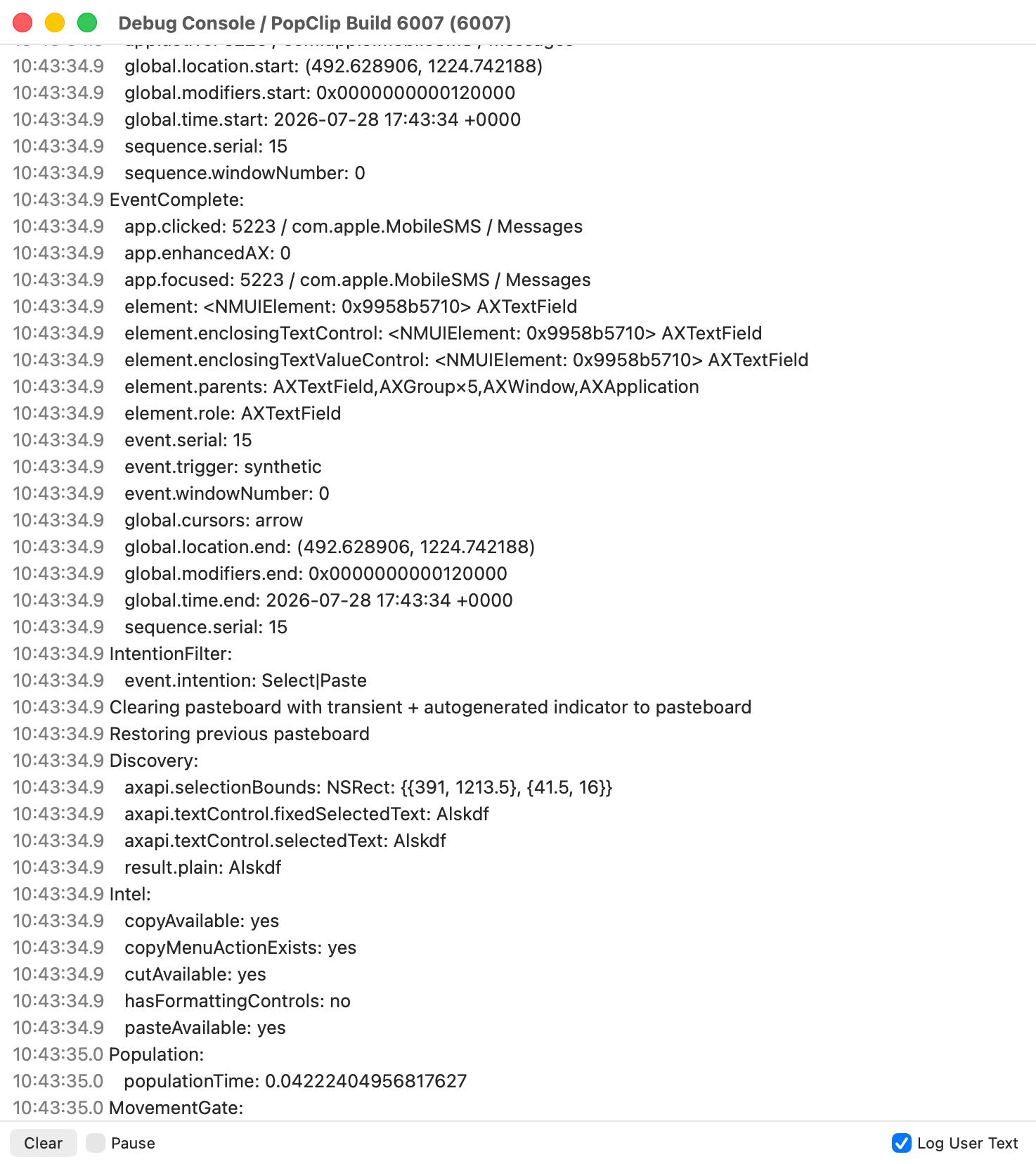
MovementGate: is the last line, nothing indented under it, and then the next thing in the log is a completely new user action. Population is only taking 58ms so nothing’s slow up to that point.
I want to be careful here though, because I captured 8 of these sequences and every single one ends at MovementGate: the same way. So this might just be where the logging stops rather than where anything’s actually stuck. I can’t tell from outside the app and I don’t want to send you off chasing something that’s just the end of the log.
The reason I’m mentioning it anyway is the name. If that stage is waiting on pointer motion events to arrive, it lines up exactly with what I’m experiencing, because on a stationary trackpad those events never come until I wiggle.
The one thing I haven’t been able to test is mouse vs trackpad. I don’t have an external mouse. My assumption is that a hand resting on a real mouse produces constant tiny movement that a lifted trackpad just doesn’t, and that would explain why you can’t reproduce this, but I haven’t actually verified that so take it for what it’s worth.
So I guess my question is whether MovementGate depends on receiving motion events. If it does, is there any chance it could also open on a short timeout, or hit-test NSEvent.mouseLocation when the popup gets shown, instead of needing a motion event that a stationary trackpad won’t send?
Happy to run any test build or extra logging if that’d help. Setup is a MacBook Pro M5 Pro, macOS
26.5.2, PopClip build 6007, built-in trackpad only.
Also, thanks for the kind word about the extension. The submenus opened up a lot, I’d been wanting to group actions like that for a while and it made the whole thing much tidier than cramming everything onto one row. Nice addition!
Thanks for this!
No, that’s just a heuristic used to decide whether PopClip shows its popup at all. It’s based on whether the mouse has moved from its initial location - just a NSEvent mouseLocation check and it’s not related to button highlighting.
The odd thing is that a similar problem was affecting some users in v2025.9, so in v2026.7 I added a fast poll timer, while the bar is showing, to update the hover highlight 30 times per second regardless of mouseEntered/mouseExited notifications from AppKit, which is previously relied on. Users who had been affected by the original issue reported no issues after I added the 30Hz poll timer.
So it’s an utter mystery what’s happening on your machine to still suppress hover updates!
For reference here’s how it is on my machines and what it’s supposed to be like:
At some point I’ll add extra debug around highlight drawing and we can dive into it deeper. Since you are the only report of this currently though, it will need to wait a bit. It’s a bit too into the weeds for right now!
You fixed it! Nice work! 
1 Like
Yes! Thank you for confirming.
Fixed it by adding a 30FPS poll to check which button the mouse is in while the popup is open, rather than relying on button-entered and button-exited notifications from AppKit, which it seems are not always reliably delivered.