I made a snippet extension to create an entry in Apple’s Calendar app:
# popclip
name:  Create Calendar Entry
icon:  iconify:vaadin:calendar
url:  kmtrigger://macro=EC3EXD3B-4XX3-4XX6-9XX9-9588XX06FBC5&value=***
It use Keyboard Maestro to open the “Quick Event” input box and pastes the selected text in there. The macro looks like this:
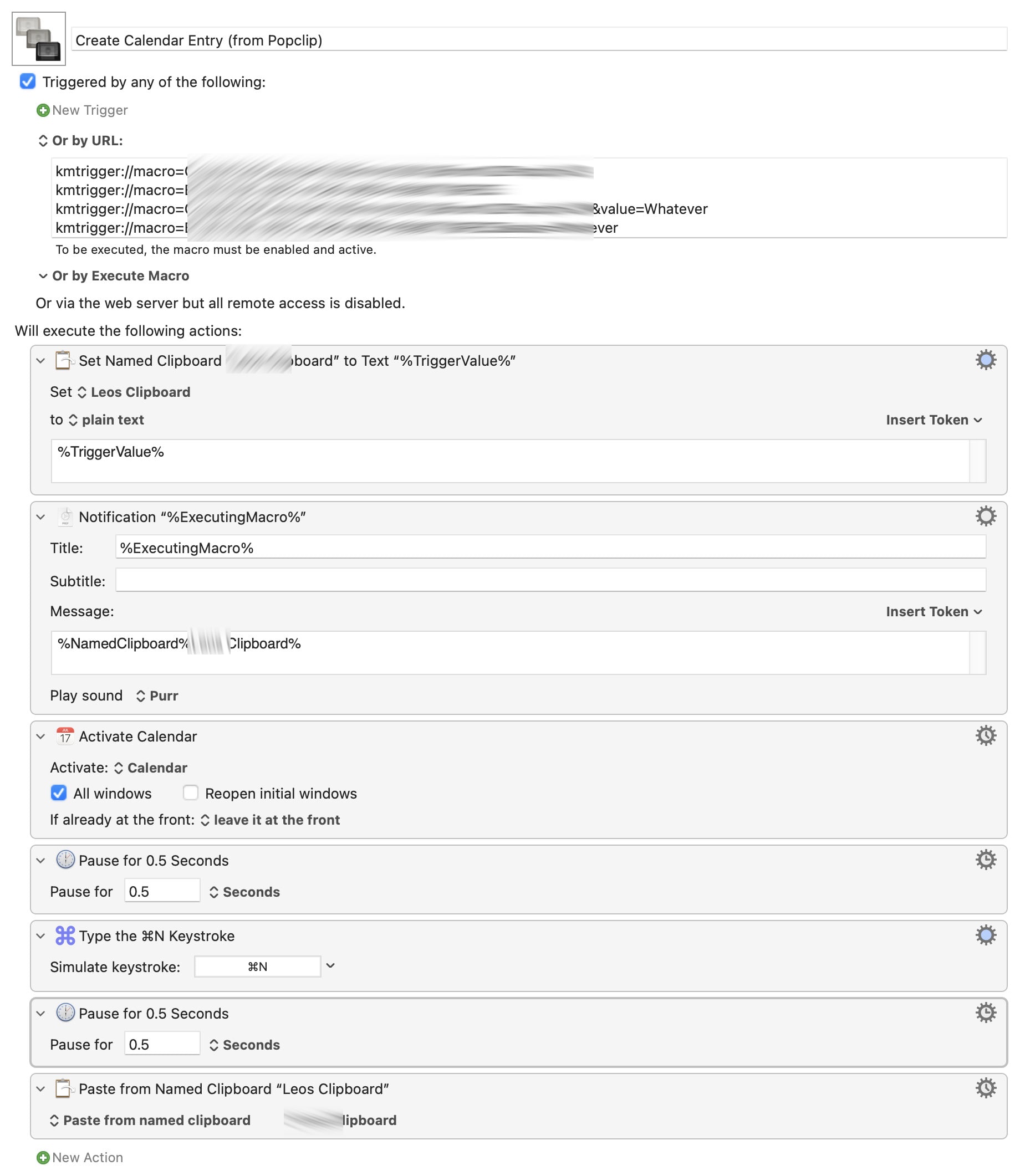
Create Calendar Entry (from Popclip)_sanitized.zip (1.2 KB)
You need to adjust the macro UUID[1] in the Popclip snippet according the UUID in your URL trigger.
This extension is pretty minimal as it just takes the selection and leaves all smarts to the target app. - And Apple’s Calendar is by far not as smart as 3rd party contenders I think.
In any case, hope this helps and have fun!
The UUID here I have santised and is not valid. - I’m not sure whether that was needed, but better safe than sorry… ↩︎