Hi @Sibee, thanks for your kind comment. For making icons distinctive by inverting them, I recommend adding a filled square to the icon using the “Adjust” panel of the icon editor. Like this:
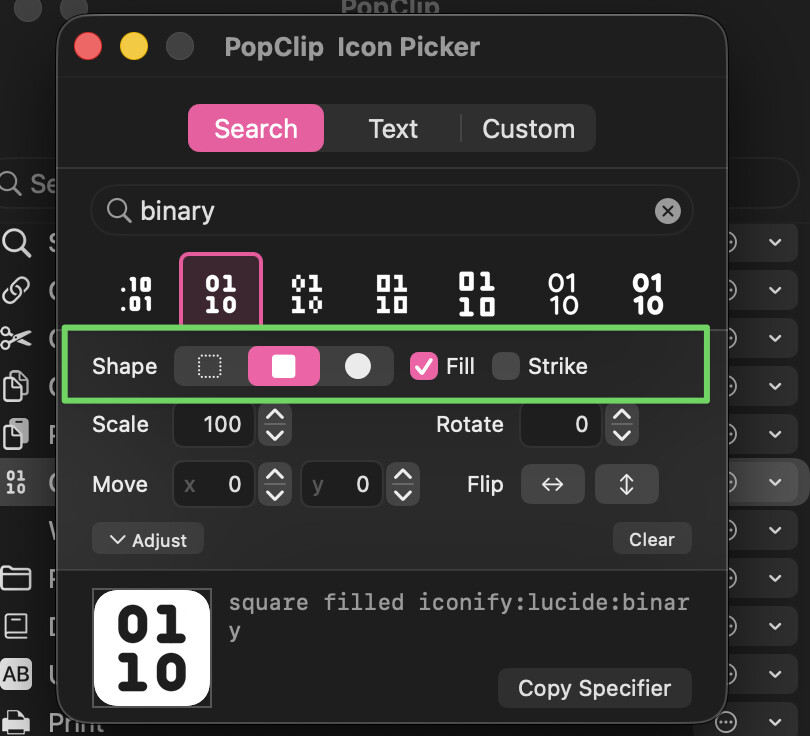
2 Likes
Hi, thanks for keeping PopClip in development. At first I was a bit upset — I don’t like buying apps twice — but then I realized I’ve been using the app since 2013. So I guess it’s a fair move to keep such a brilliant tool alive and updated. Good luck!
3 Likes
Thanks for this, good to know and it could be useful. It would be great to have similar invert options for text folders. Something in the ballpark of this, where it still feels simple but clearly delineates folders. Thanks again for the tip, hope you can consider something like this.

1 Like
Hi @nick, where are the new custom ‘Config.yaml’ .popclipext files located?
It doesn’t seem to be in the old Extensions folder anymore. Thanks!
Hi @kxxc,
When you install an extension, PopClip no longer puts the files on the disk but instead stores them in a database. This is necessary to support the iCloud Sync and other features in the new version.
The location of the database is inside the “Data” folder next to the old extensions folder. But you shouldn’t really poke around in there, as you won’t be able to actually access the files.
If you want to access the source files from any extension, you can use the View Source feature.
Thanks for the explanation.
So if I want to edit an extension, is copying it to another app to edit and then reinstalling it? That’s how I’m doing it currently.
It seems the settings only have “Copy” and “Export” options, but no direct edit feature.
Thanks!
That’s right, to edit an extension you’d need to export/copy it, edit, and install.
For me, the best workflow is to have a .popclipext folder where you edit it, and then double-click that folder every time you need to update it with your edits.
Alternatively, work with a snippet and just keep installing the new snippet.
Or you can do open -a PopClip MyExtension.popclipext from command line.
See the following thread for an extended discussion about an “edit” feature: Add the ability to directly edit its extension
1 Like
Brett Terpstra created MacOS application FileRouter (https://filerouter.app). I found very nice usage when I create PopClip extension - I can first select an editor and next select PopClip to install extension - both selected from list. It works also from BBEdit sidebar („Run in Finder”).
1 Like
2 posts were split to a new topic: PopClip bar position query