Announcing the release of PopClip 2026.7, bringing some of the most-requested features: iCloud sync, subfolders in the PopClip bar, action duplication with name/icon customization, and extension auto-update.
Note: This is a paid update for some users
It is a free update for all Lifetime License holders, for Standard License holders still in their free updates period, and for Mac App Store customers who bought PopClip on or after January 1, 2019.
It is an optional paid update for customers who bought PopClip in 2018 or earlier. After updating to this version, PopClip will revert to trial mode with 250 uses for you to try all features. The “Upgrade…” button in the App settings pane leads to two offers: (1) 30% off a Lifetime License (free updates forever) — current offer price US$22.40 + tax, or local equivalent; or (2) a free Standard License (2 more years of updates) — nothing to pay. You can also choose not to update, and continue using your current version as-is. This is the first paid update in PopClip’s history, after 15 years of free updates. Your license purchase will support the ongoing development of the app.
What’s New
Compatibility
The minimum system requirement is now macOS 13.5 Ventura.
Initial support for macOS 27 Golden Gate beta.
New: iCloud Sync
PopClip now syncs your installed extensions, actions layout, and action settings between all your Macs using iCloud.
iCloud Sync can be enabled or disabled from the new Tools menu at the bottom of the Actions pane. It defaults to “on” for fresh installs; otherwise it stays off until you are ready to sync.
All synced copies merge their actions lists together to form one unified view. Please note that sync is not always instant; change propagation depends on the current iCloud weather, but all computers will converge eventually.
Per-action secrets (sign-ins, API keys etc.) also now sync securely via the iCloud Keychain.
New: Actions list overhaul
Unlimited actions: There’s no upper limit on how many extensions you can install or how many actions you can configure.
Multiple instances: Extensions can now have more than one instance. Each instance is a unique action with its own name, icon, settings and position in the PopClip bar.
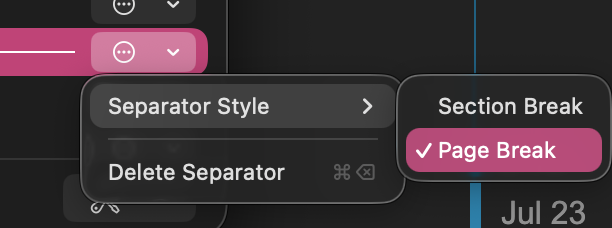
Folders and separators: Actions can be organized into folders, which appear as submenus in the PopClip bar. Separators and page breaks can be added between actions.
Rename any action; choose a custom icon; per-action “Show As” (icon/text).
A new icon picker lets you search open-source icons via Iconify, create text-based icons with shape and style options, or drop in your own SVG or PNG.
Arrange actions and folders using drag & drop or keyboard commands (⌘X/⌘C/⌘V/⌥⌘V), with undo and redo (⌘Z/⇧⌘Z) support.
Duplicate an action to use its settings as the basis for a new action.
Search the list with ⌘F to quickly find actions.
Action submenus: extensions can now define actions that have their own right-click submenus for supplementary actions.
New: Improved extensions management
Extensions auto-update: Extensions from the PopClip Extensions Directory can now update to the latest version automatically.
A new Extension Info sheet shows extension origin, version, and signature status.
A new Manage Extensions sheet shows a plain list of installed extensions (alphabetical, or by install date) and lets you manage updates.
A new View Source command shows the source code for every extension.
Action settings sheet improvements
Signed-in account name can be shown after signing in to an extension.
Multiline text fields for longer string inputs (such as prompts).
Multiple-choice options can offer “Other…” (free text entry) and “None” (no selection).
Links in option descriptions are now clickable.
Password fields get a reveal “eye”.
Small stuff
The PopClip bar now expands to use more of the screen width. (Use a “Page Break” separator to manually control where the first page ends.)
The “More” overflow button shows page position (n of m).
Smoother button hover highight response.
Original clipboard contents are now restored after actions paste over the selected text. (Note: use Terminal command defaults write com.pilotmoon.popclip KeepPastedTextOnClipboard -bool YES to restore previous behaviour.)
Built-in actions can now be deleted. (Resurrect them from the Extensions list.)
The Spelling action can now be moved.
The built-in Search action now offers a choice of preset search engines, plus a custom option.
Holding ⌥ when activating Search or a search extension now wraps the search term in double quotes. (“Alternate Search URL” is removed.)
Fixes
Ecosia is recognized as a known browser.
Fixed the Messages extension on macOS 27 beta.
Changes for extension authors
Extensions can now have their own submenus or right-click context menus.
Only suggestion is to move the iCloud sync to a prominent button on the “General” settings page. Right now it’s buried 3 clicks deep, I don’t imagine a lot of people look up the release notes and wouldn’t even know iCloud sync was released as a feature (auto update or updating via brew like me).
Having it on the main settings page should at-least give it some visibility when someone does open popclip and enable it. It would reduce frustration for the future when they inevitably have to reinstall popclip and have suffered data loss .
However, I feel frustration as a long-time user who, in the end, has to pay It’s understandable to a certain extent, but in another sense, support for long-time users has not been taken into account.
The update is more expensive than the application when initially purchased (€7).
In any case, this update brings plenty of long-awaited new features, which is really great!
I regret that the choice of a number of applications displayed has not been added, which would allow real customization, but the folders will go some way to making up for this lack.
I hope you feel you have had good value from your €7 up until now. At the time (10 years ago I guess? by that price), PopClip was a much simpler app and it that has benefited from many new features and ongoing developments. You will see that there is a discounted lifetime license offer and a free one-year license offer available to you. If you still struggle with affordability after that please contact me and I am sure I can come to an arrangement to help.
Tell me more about this – if you mean how many actions to show on the first page, you can do this by adding a separator and can set it as a “Page Break” separator.
Thanks for the thoughts! I did some thinking about whether sync should just default to be on.
Settled on the current design, but I agree there is possibly a discoverability issue.
For brand new users, it does default to on - so this only affects users who are updating.
I wanted to avoid the situation where two different machines with different action setups would merge in to each other by iCloud unexpectedly. It seems better for the user to have to turn on iCloud Sync and then see it happen rather than it happening “to” them, unasked for.
Yep that’s what I guessed as well, enabling it for old installs might disrupt people’s set workflows with unexpected new extensions and unexpected duplicates. Old installs should definitely have a opt-in behaviour, just more visible upfront that this has been introduced, maybe even as a one-time popup letting people know popClip now has a long standing request available as a feature
I am a long-time PopClip user and can’t imagine my workflow without it. Unfortunately, I cannot pay for the upgrade because I am from Russia, and we currently have no way to transfer money abroad.
It took me a while to find the iCloud Sync button. My actions list had been expanded so it went off the bottom of the page. Once I shrank it back down, I found the sync button.
Previously, if you press an action — for example, Uppercase — PopClip would put the uppercase text on the clipboard and invoke paste to get the application to replace your selected text (My text → MY TEXT)
It would also leave the MY TEXT on the clipboard.
I had users complain that they didn’t want this. They wanted whatever they already had on the clipboard before to stay there.
So in this version, after pasting MY TEXT, it puts back whatever you had on the clipboard before.
However, I’ve already had two complaints from people who liked the old behavior
Either way, you can control it with the following Terminal commands:
yes good call this one. i hesitated to turn it on because they are not exactly mirrored across my two main macs but i figured that they would just combine based on your release notes? then i can remove the ones i dont want - a handful at most.
Yes, I think the best approach is to just turn the sync on for all machines regardless of the initial states, and then do a little clean up afterwards.
For exact duplicates (same extension with same settings), it will pick one and discard one, so there shouldn’t be too much mess.
This is such a fantastic update. Thank you for all your hard work. I’ve been using Popclip since it came out, since I’m a little broke at the moment I’m very thankful for the two year extension, but I will be buying it again in the future, can’t live without it!
The icon selections are so welcomed. And the addition of folders is such a great solution to allowing unlimited Popclip extensions. In conjunction with the separators, it is a clever way to make sections distinct. However on a busy background with two folders and more, I find myself getting a little visually lost. I do have slightly impaired vision which doesn’t help. Folders lose (for me) that instant muscle memory speed, which I love Popclip for, and I’d love to see implemented some small visual customisation of the folders to make them a little more instantly distinct; perhaps allowing folder colours to be inverted, so they stand out as white-on-black for example, while the rest of Popclip remains black on white? Or (maybe against your principles!) allow a little dot of colour or something.
 .
. It’s understandable to a certain extent, but in another sense, support for long-time users has not been taken into account.