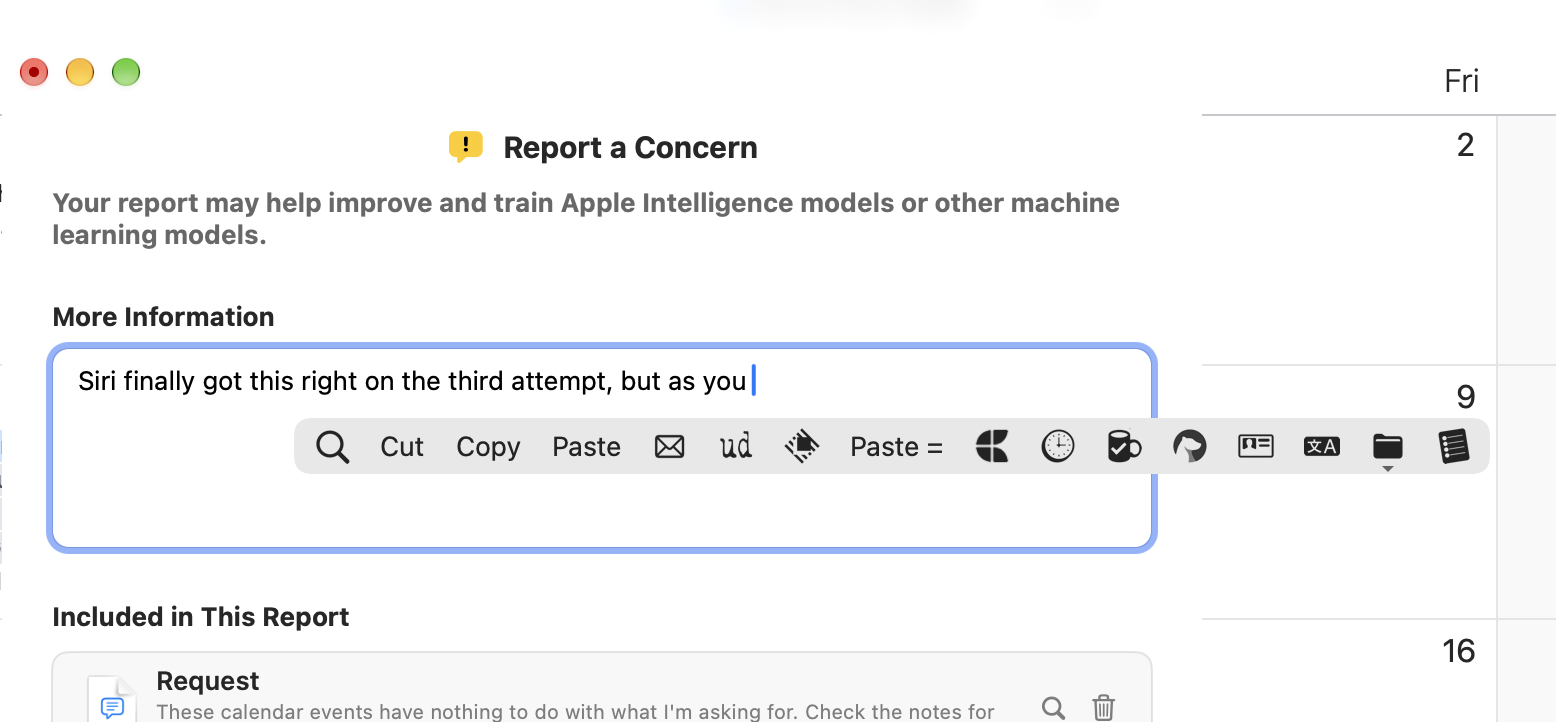
PopClip recently started popping up at seemingly random times when there is no text selected. Even now, it keeps popping up while I’m typing. It appears normally when I select text, but obviously nothing is selected while you’re typing.
This started recently, I think after upgrading to macOS 27.0 and now is continuing in 27.2. It happens in any app or anywhere in the macOS UI including Finder or Feedback Assistant (screenshot below).
Wow, that’s interesting! I wonder what’s causing that. This is the first report I’ve heard of this, and I haven’t seen it myself yet. Please keep an eye on it to see if there is a particular situation where it happens more often. In a particular app, say? Any clues as to how I can reproduce the problem would really help.
Thanks for the quick response. I’ve been holding off on posting an update until I had a chance to do a little more troubleshooting and observation.
This issue appears to be occurring in any app that accepts text input (i.e. anywhere PopClip operates). I wish I could provide some tips on how to reproduce it, but at this point I’m not sure.
PopClip just appears intermittently while typing in various apps. I’ve used PopClip for several years with no issues at all, so this is unprecedented.
Systematic troubleshooting will continue until I find the cause. For example, I use several apps that monitor input (e.g. KeyCue) and automation apps like Hammerspoon. I’m eliminating each potential cause one-by-one. For example, I’ve already tried disabling Hammerspoon and Hazeover, but the issue continued.
At the moment, I’m testing a wired mouse instead of my Apple Magic Trackpad. And I already tried an alternative wireless Bluetooth mouse from Logitec, so I’m looking at hardware as well. I’ll let you know how it goes…
Thank you for trying to diagnose it. It’s not something anybody else has reported, nor am I able to reproduce it. Do you have a keyboard shortcut set for PopClip? Also, you say “while typing” but do you notice any particular keypress that causes PopClip to appear?
My only guess is that you could have set the keyboard shortcut to something like Shift + a letter. Then every time want to type that capital letter, PopClip would appear.
I finally figured it out! I have not assigned any keyboard shortcut to PopClip. What’s happening is this:
I tend to jump around a lot while editing—going back to change something I wrote earlier. As soon as I double-click a word or click and drag to highlight a group of words, PopClip’s popup window displays as expected.
The problem is, even after I press Delete or Backspace or just start typing to replace the highlighted text, the PopClip window remains openeven though nothing is currently selected at this point. The window remains open while I continue typing. Even pressing the Esc key won’t close PopClip’s window! The only way to close it is: (a) clicking an insertion point again in the same or a different app or (b) selecting an option in PopClip’s menu.
So, PopClip is not closing it’s window when there’s no longer any active selection. Now that I recognize the pattern, this is consistently repeatable for me, not intermittent. Previously, I didn’t even notice PopClip’s window being open until after I had already been typing for a few seconds.
I don’t remember this ever happening before macOS 27.
Got it! Yes, that explains it perfectly. I can confirm the issue with PopClip not dismissing itself upon keyboard activity. This is something that came in with macOS 27 and only just got discovered. The latest PopClip beta (available via in-app update) already fixes the problem and there will be a new production PopClip version with the fix out soon.